Introduction
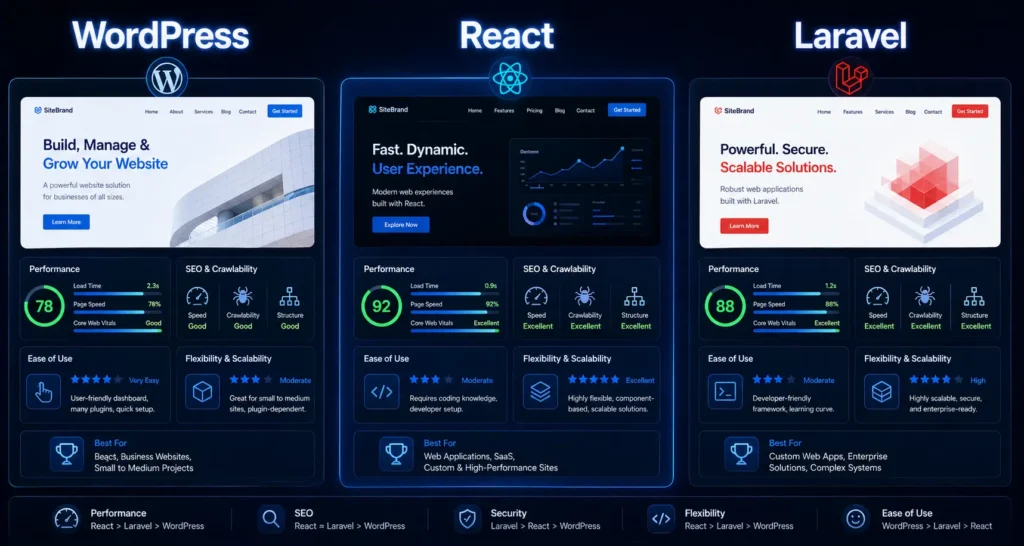
Choosing between React, WordPress, and Laravel for a new website often comes down to who you talk to last. Ask a React developer, you get React. Ask a WordPress agency, WordPress. The honest answer is: it depends on the project, and SEO should be one of the deciding factors.
This post is not going to tell you one stack is universally better. Each has real SEO advantages and real SEO liabilities. The right choice depends on your content volume, technical resources, and how much SEO matters relative to other project requirements.
What Google actually cares about (stack-agnostic)
Before comparing stacks, it is worth being clear on what Google ranks on. The algorithm does not care whether your site is built in React or PHP. It cares about:
- Page speed (Core Web Vitals: LCP, INP, CLS)
- Crawlability (can Googlebot access and read the content)
- Mobile usability
- Content quality and relevance
- Schema markup
- Backlinks and domain authority
Any stack, built well, can score well on all of these. The differences show up in how easy or hard each stack makes it to do these things correctly.
WordPress for SEO
WordPress powers about 43% of the web. It is the most common CMS for a reason: a non-developer can manage content, plugins handle most SEO needs, and the ecosystem is vast.
SEO advantages
- Yoast SEO or Rank Math handle meta titles, descriptions, XML sitemaps, and canonical tags with no code required
- URL structure is controllable (no query strings by default)
- Schema plugins available for LocalBusiness, FAQPage, Article, and more
- Fast to deploy and update content, which helps content velocity
- Google has crawled WordPress sites for 20 years — no surprises
SEO liabilities
- Plugin bloat is a real problem. A site with 30 active plugins can have LCP scores above 6 seconds
- Shared hosting plans common in India (Hostinger, GoDaddy shared) produce slow TTFB
- Theme code quality varies wildly — a badly coded theme can override all your SEO plugin work
- Core Web Vitals require dedicated optimisation work (caching, image optimisation, CDN)
Best for
Content-heavy sites, local businesses, businesses where a non-developer will manage the CMS regularly, e-commerce (WooCommerce), blogs.
React (Next.js) for SEO
React alone is an SEO problem. A pure client-side React app sends an empty HTML shell to Googlebot, which then has to execute JavaScript to see the content. Google can do this but it is slower and less reliable than serving pre-rendered HTML.
Next.js changes this. It adds server-side rendering (SSR) and static site generation (SSG) to React, which means Googlebot gets proper HTML on first load.
SEO advantages of Next.js
- SSG pages load extremely fast — LCP under 1.5 seconds is achievable
- Full control over every meta tag, canonical, and schema implementation
- No plugin system means no plugin bloat
- Image optimisation built in (next/image automatically converts to WebP, uses lazy loading)
- Excellent Core Web Vitals scores when built correctly
SEO liabilities
- Requires developer involvement for every SEO change — non-developers cannot manage meta titles without custom CMS integration
- Higher development cost and time
- SSR pages can still be slow if not configured correctly
- Headless CMS required for content management, adding complexity and cost
Best for
Performance-critical sites, SaaS landing pages, sites where Core Web Vitals must score green, large-scale projects with dedicated developer resources.
Laravel for SEO
Laravel is a PHP framework — not a CMS. Out of the box, it has no SEO features. Everything must be built or integrated. Used correctly, Laravel produces clean, fast sites. Used without SEO attention, it produces slow, poorly structured ones.
SEO advantages
- Clean URL routing with no CMS overhead
- Fast response times when properly configured with caching (Redis, opcache)
- Full control over HTML output — no theme or plugin interfering
- Good for custom applications that need specific SEO logic built in
SEO liabilities
- No built-in SEO tooling — sitemap generation, meta tags, and schema must be coded or integrated via packages
- Content management requires a custom admin panel or a headless CMS
- Most Laravel developers are backend-focused and may not think about SEO by default
- Harder to audit and maintain SEO on large sites without dedicated tooling
Best for
Custom web applications, platforms with complex business logic, sites that are more application than content (SaaS, booking systems, directories).
Comparison table
| Factor |
WordPress |
React (Next.js) |
Laravel |
| SEO setup effort |
Low (plugins) |
High (manual) |
Very high (custom) |
| Core Web Vitals potential |
Medium (needs work) |
High (with SSG) |
High (with caching) |
| Content management |
Easy (non-dev) |
Requires CMS integration |
Requires custom admin |
| Development cost |
Low–Medium |
High |
High |
| Plugin/theme risk |
High |
None |
None |
| Best LCP achievable |
2–3s (optimised) |
Under 1.5s |
Under 2s |
| Typical Indian agency support |
Very common |
Growing |
Common |
The practical question to ask
The right question is not “which stack is best for SEO?” It is: who will manage this site after launch, and what does SEO actually need to achieve for this project?
- If a client will update content weekly and the SEO goal is blog rankings: WordPress.
- If Core Web Vitals and page speed are non-negotiable and a developer is always available: Next.js.
- If the project is a custom application that happens to have a public-facing site: Laravel with a headless CMS or WordPress front-end.
Conclusion
React, WordPress, and Laravel can all rank well on Google. The differences are in how much effort correct SEO requires and who can manage it after launch. Stack selection should be a decision made with SEO requirements on the table alongside design, budget, and maintenance considerations — not an afterthought.
If you are unsure which stack fits your next project, get in touch for a free consultation and we will tell you what makes sense for your requirements.